
 In the tutorial, click on "Step 1" or scroll down on the Website until you reach the 'Get Started Now' section and download the app 'The Mining Race' from the App Store (iOS) or Google Play (Android). You can also use your preferred browser.
Your choice

Make your choice:
1. Google Play for Android
2. App Store for iOS
3. Continue on web
Create New Wallet
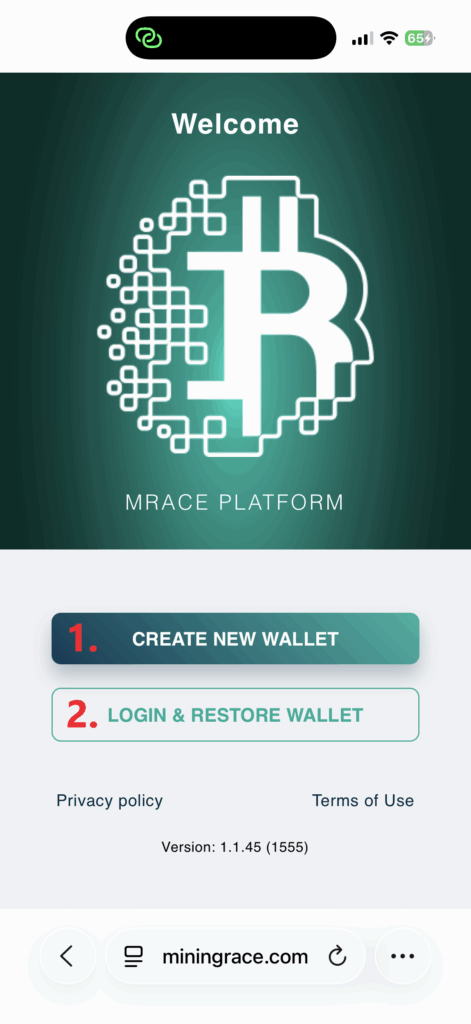
Click on 'Create new wallet' to continue.
1. Create new wallet
2. Login & restore wallet
Enter Your Details
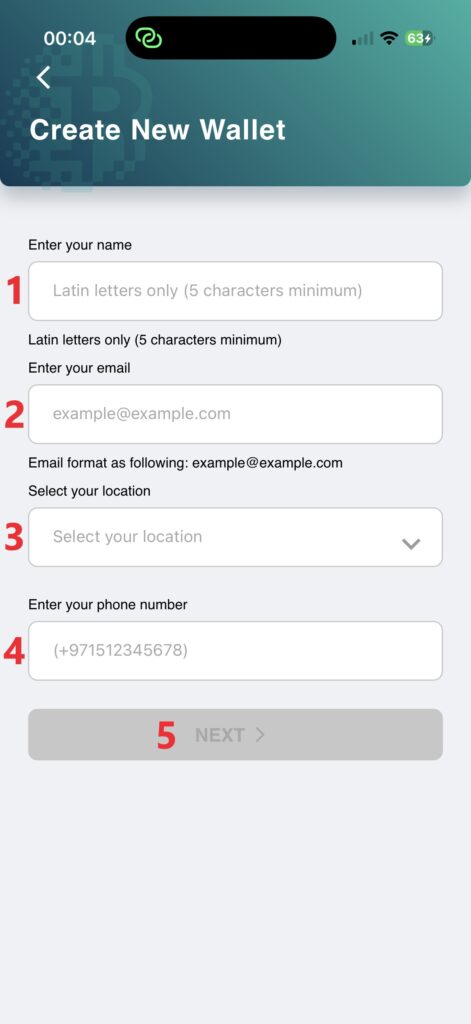 1. Enter your name (latin letters only and 5 characters minimum)
2. Enter your email
3. Select your location
4. Please enter your phone number in international format (e.g., +1...).
5. Once all fields are correct, the button 'Next' will be enabled. Click it.
Set a password
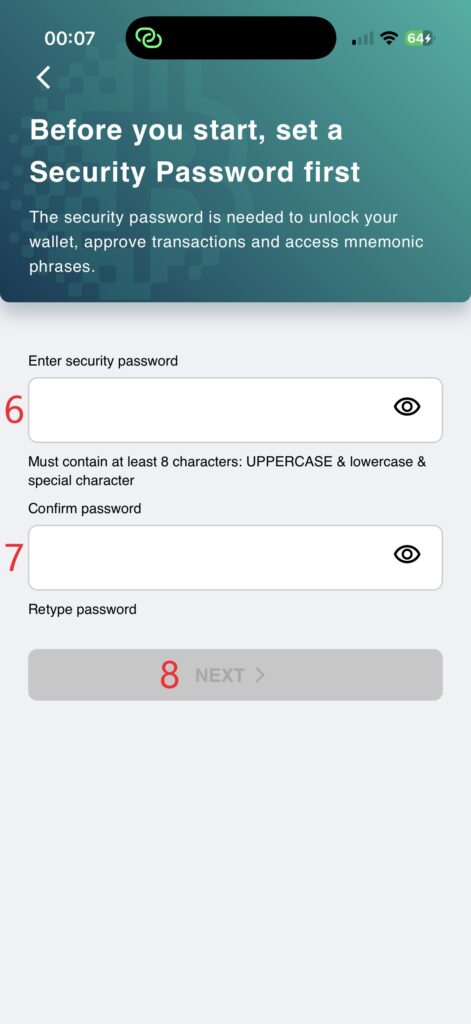 6. Enter a password. The password must be at least 8 characters long and include uppercase and lowercase letters, and special characters.
7. Re-enter your password to confirm.
8. Once all fields are correct, the button 'Next' will be enabled. Click it.
Back up your wallet
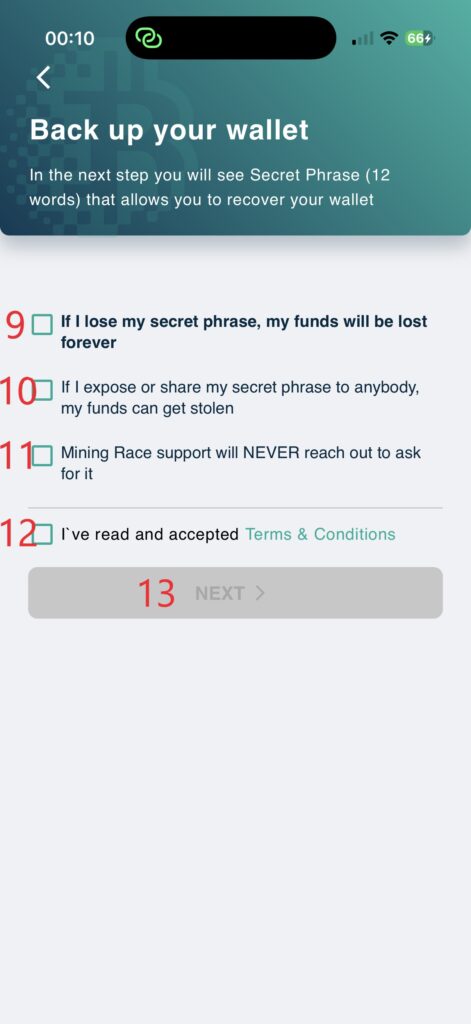 9. If I lose my secret phrase, my funds will be lost forever
10. If I expose or share my secret phrase to anybody, my funds can get stolen
11. Mining Race support will NEVER reach out to ask for it
12. I've read and accepted Terms & Conditions
13. Check all four boxes. The button 'Next' will be enabled. Click it.
Secret Phrase
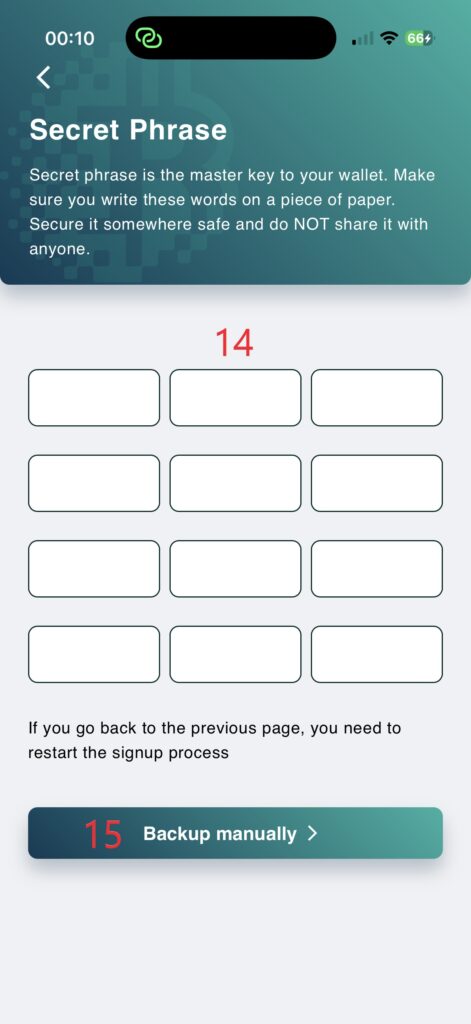 14. The secret phrase is the master key to your wallet. Make sure you write these words on a piece of paper. Copy them exactly as they appear, keeping the correct order, in 3 columns and 4 rows. Secure it somewhere safe and do NOT share it with anyone.
15. Once you have written down the Secret Phrase, click 'Backup manually'.
Confirm Secret Phrase
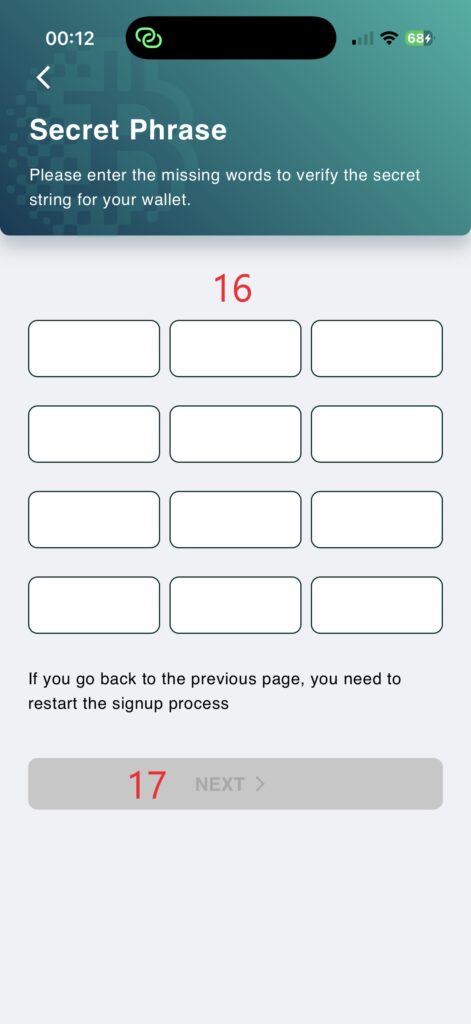 16. Please enter the missing words to verify the secret phrase for your wallet. Note: The words are case-sensitive. Be aware that your phone may automatically capitalize the first letter when you tap into a new field.
15. Once all fields are correct, the button 'Next' will be enabled. Click it.
Analyze application activity
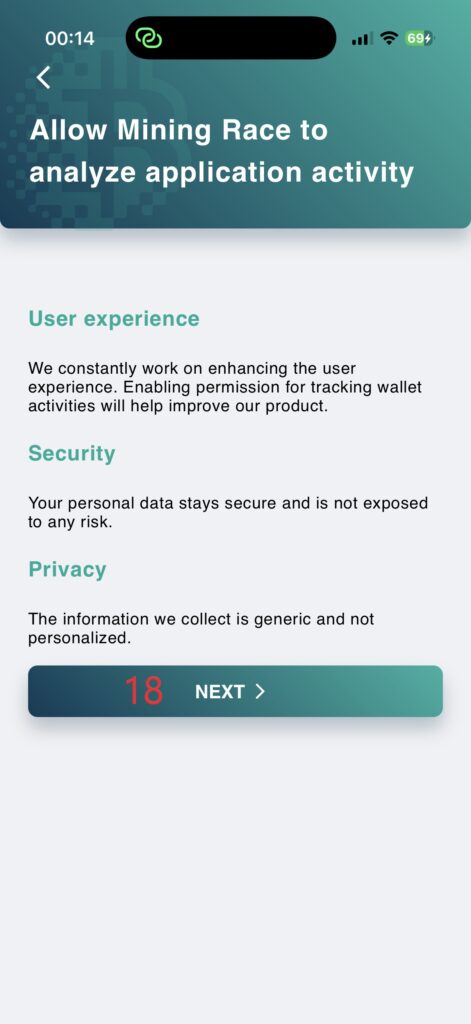 User experience:
We constantly work on enhancing the user experience. Enabling permission for tracking wallet activities will help improve our product.
Security:
Your personal data stays secure and is not exposed to any risk.
Privacy:
The information we collect is generic and not personalized.
18. Click 'Next'.
Confirm your email
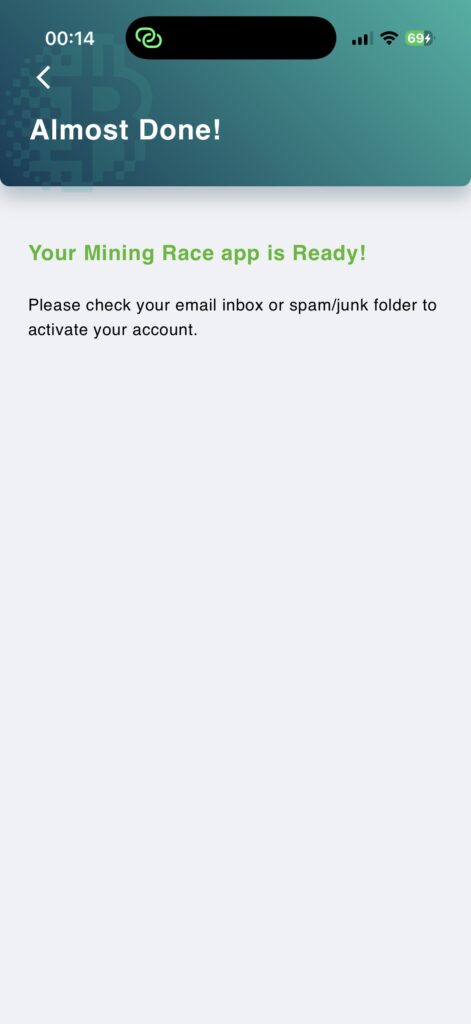
Your Mining Race app is Ready!
Please check your email inbox or spam/junk folder to activate your account.
Activate Your Account
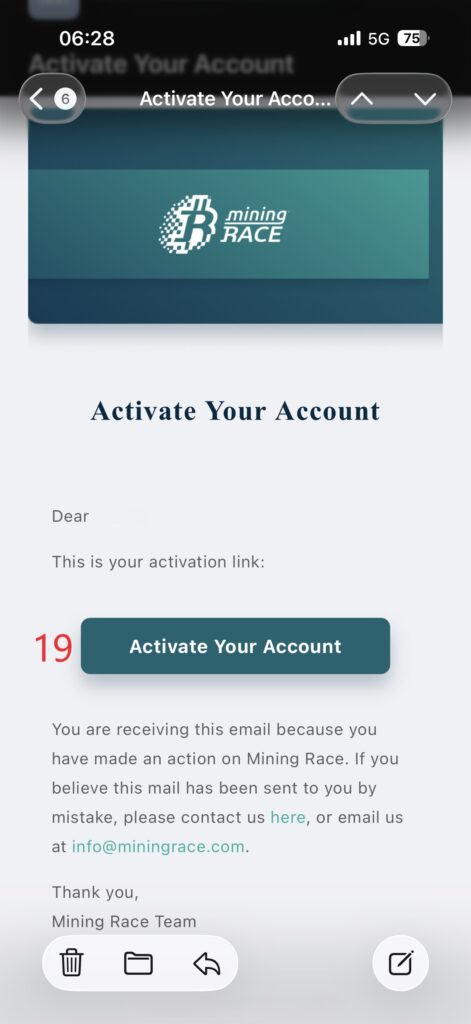
19. Click 'Activate Your Account' in the email. After activation, if you are on your smartphone, close the browser tab and switch back to the app.
Start Bitcoin mining
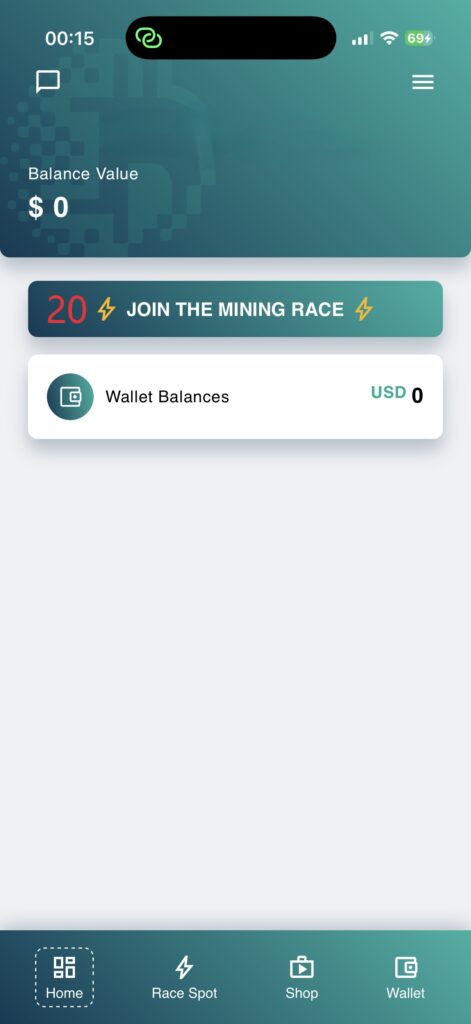
20. Click 'JOIN THE MINING RACE'
Activate spot

21. Scroll down and click 'ACTIVATE RACING SPOT'
Select your full-service contract

22. Choose your Full-Service-Contract, but note the maximum number of mining cards, and click + once.
Why a Full-Service Contract? This covers 24/7 hosting in professional data centers, expert maintenance, and scalability up to 15,000 TH/s.
-
Zero Effort: No noise, no heat, no setup at your private location.
-
More details in our FAQ.
23. Click 'Add to Cart'
Code

24. Enter the code:
25. Click 'SUBMIT'
Contract to cart
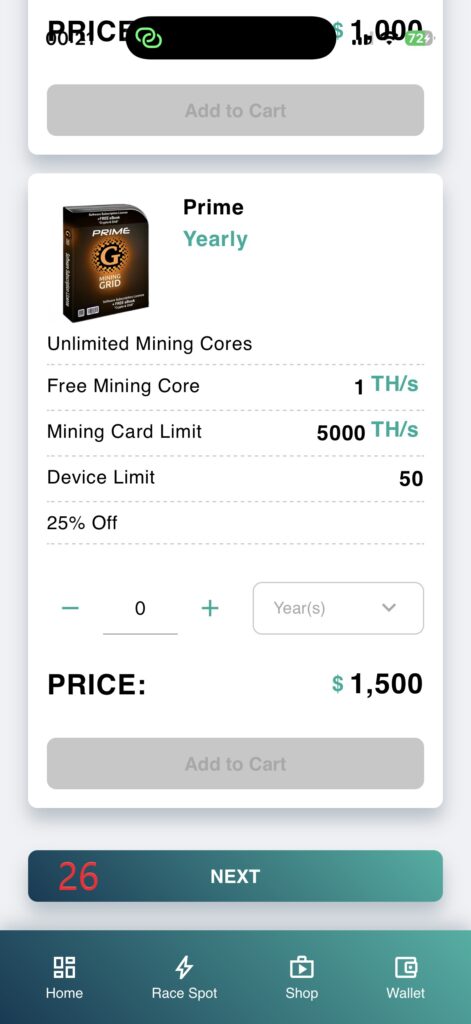
26. Scroll down and click 'NEXT'
Optional additional Mining Cores

27. Click 'NEXT'
Cards to Cart

28. Add the desired number of cards by clicking the + button.
29. Click 'Add to Cart'
30. Click 'NEXT'
Cart Summary
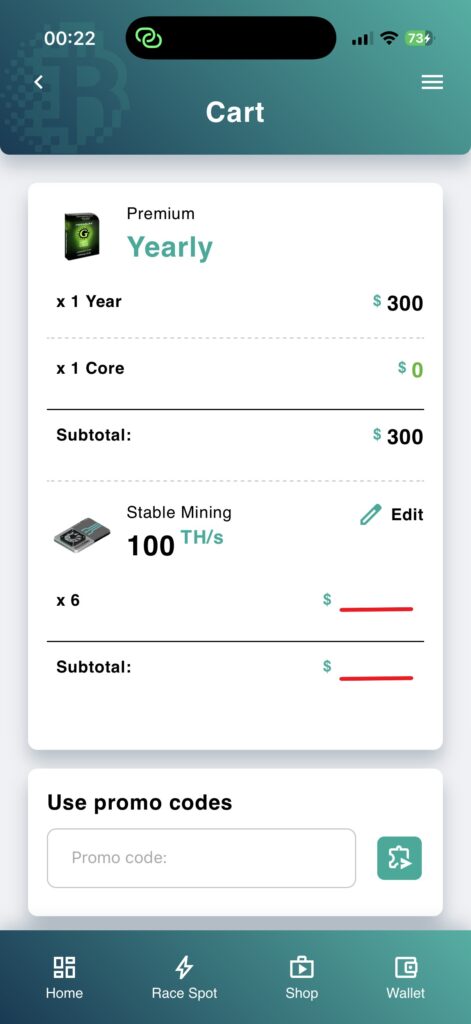
Please review your cart summary. Then, scroll down to proceed with the payment.
Pay with credit card
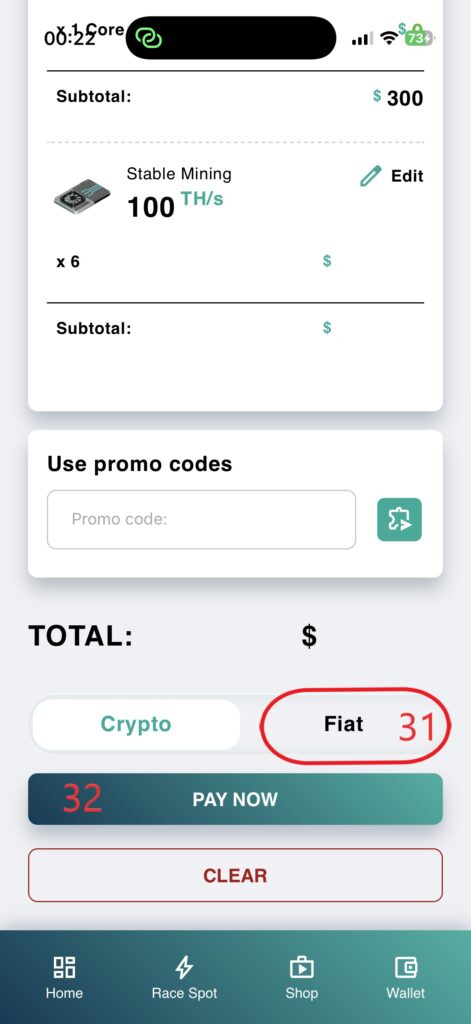
31. Click 'Fiat'
32. Click 'PAY NOW'
Fill in the billing information
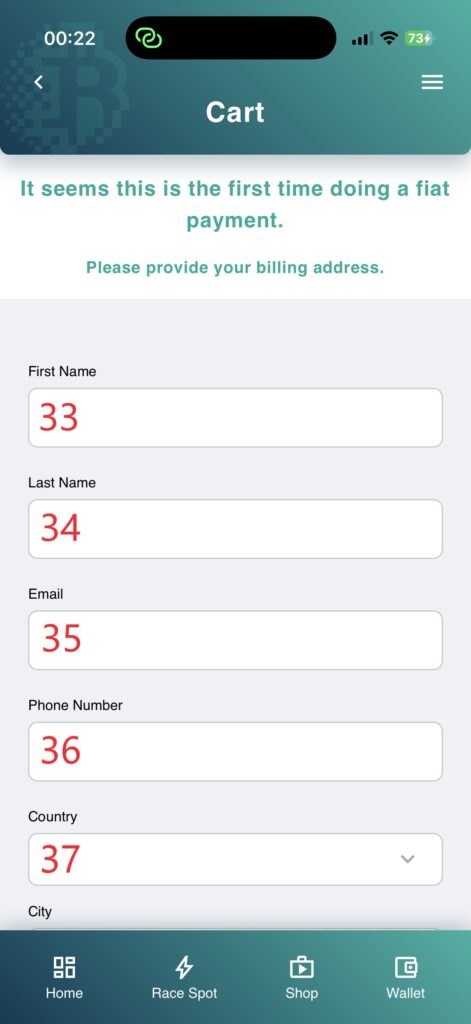
It seems this is the first time doing a fiat payment. Please provide your billing address.
33. First Name
34. Last Name
35. Email
36. Phone Number
37. Country
38. City
39. Address
40. Click 'Submit'
ToS
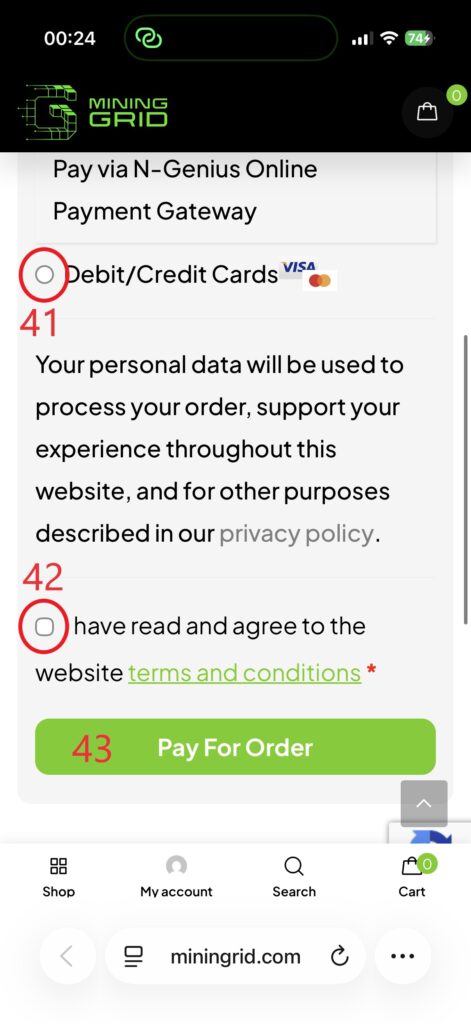
41. Select 'Debit/Credit Cards'
42. Check the box 'I have read and agree to the website terms and conditions.'.
43. Click 'Pay For Order'
Credit Card
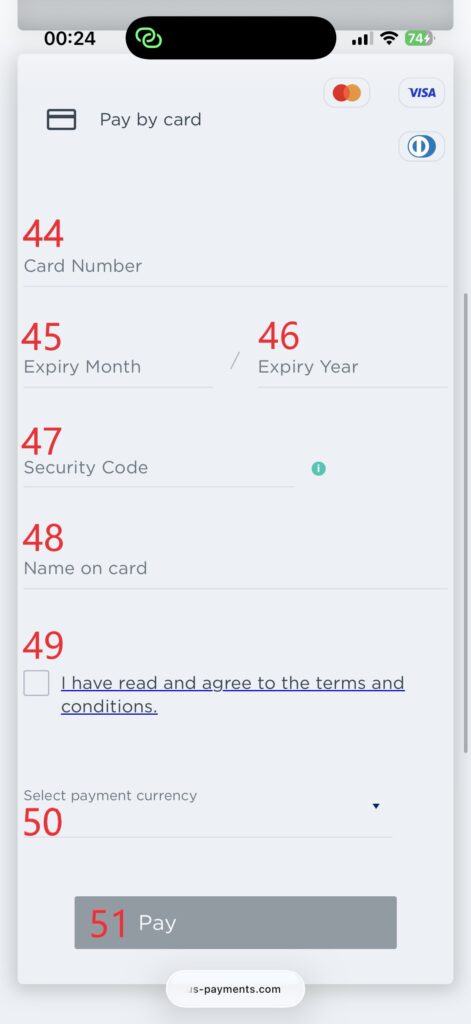
44. Card Number
45. Expiry Month
46. Expiry Year
47. Securty Code
48. Name on card
49. Check the box 'I have read and agree to the terms and conditions'.
50. Select payment currency
51. Click 'Pay'
Your choice
Make your choice:
1. Google Play for Android
2. App Store for iOS
3. Continue on web
Create New Wallet
Click on 'Create new wallet' to continue.
1. Create new wallet
2. Login & restore wallet
Enter Your Details
1. Enter your name (latin letters only and 5 characters minimum)
2. Enter your email
3. Select your location
4. Please enter your phone number in international format (e.g., +1...).
5. Once all fields are correct, the button 'Next' will be enabled. Click it.
Set a password
6. Enter a password. The password must be at least 8 characters long and include uppercase and lowercase letters, and special characters.
7. Re-enter your password to confirm.
8. Once all fields are correct, the button 'Next' will be enabled. Click it.
Back up your wallet
9. If I lose my secret phrase, my funds will be lost forever
10. If I expose or share my secret phrase to anybody, my funds can get stolen
11. Mining Race support will NEVER reach out to ask for it
12. I've read and accepted Terms & Conditions
13. Check all four boxes. The button 'Next' will be enabled. Click it.
Secret Phrase
14. The secret phrase is the master key to your wallet. Make sure you write these words on a piece of paper. Copy them exactly as they appear, keeping the correct order, in 3 columns and 4 rows. Secure it somewhere safe and do NOT share it with anyone.
15. Once you have written down the Secret Phrase, click 'Backup manually'.
Confirm Secret Phrase
16. Please enter the missing words to verify the secret phrase for your wallet. Note: The words are case-sensitive. Be aware that your phone may automatically capitalize the first letter when you tap into a new field.
15. Once all fields are correct, the button 'Next' will be enabled. Click it.
Analyze application activity
User experience:
We constantly work on enhancing the user experience. Enabling permission for tracking wallet activities will help improve our product.
Security:
Your personal data stays secure and is not exposed to any risk.
Privacy:
The information we collect is generic and not personalized.
18. Click 'Next'.
Confirm your email
Your Mining Race app is Ready!
Please check your email inbox or spam/junk folder to activate your account.
Activate Your Account
19. Click 'Activate Your Account' in the email. After activation, if you are on your smartphone, close the browser tab and switch back to the app.
Start Bitcoin mining
20. Click 'JOIN THE MINING RACE'
Activate spot
21. Scroll down and click 'ACTIVATE RACING SPOT'
Select your full-service contract
22. Choose your Full-Service-Contract, but note the maximum number of mining cards, and click + once.
Why a Full-Service Contract? This covers 24/7 hosting in professional data centers, expert maintenance, and scalability up to 15,000 TH/s.
-
Zero Effort: No noise, no heat, no setup at your private location.
-
More details in our FAQ.
23. Click 'Add to Cart'
Code
24. Enter the code:
25. Click 'SUBMIT'
Contract to cart
26. Scroll down and click 'NEXT'
Optional additional Mining Cores
27. Click 'NEXT'
Cards to Cart
28. Add the desired number of cards by clicking the + button.
29. Click 'Add to Cart'
30. Click 'NEXT'
Cart Summary
Please review your cart summary. Then, scroll down to proceed with the payment.
Pay with credit card
31. Click 'Fiat'
32. Click 'PAY NOW'
Fill in the billing information
It seems this is the first time doing a fiat payment. Please provide your billing address.
33. First Name
34. Last Name
35. Email
36. Phone Number
37. Country
38. City
39. Address
40. Click 'Submit'
ToS
41. Select 'Debit/Credit Cards'
42. Check the box 'I have read and agree to the website terms and conditions.'.
43. Click 'Pay For Order'
Credit Card
44. Card Number
45. Expiry Month
46. Expiry Year
47. Securty Code
48. Name on card
49. Check the box 'I have read and agree to the terms and conditions'.
50. Select payment currency
51. Click 'Pay'
Create New Wallet
1. Enter your name (latin letters only and 5 characters minimum)
2. Enter your email
3. Select your location
4. Please enter your phone number in international format (e.g., +1...).
5. Once all fields are correct, the button 'Next' will be enabled. Click it.